The horrors of Photoshop text rotation
Whilst having a good laugh at the Internet Explorer 8/Nickelback promotion this morning (submitted to Reddit with the amusing headline Lose-lose. Download Internet Explorer 8 get a Nickelback mp3.), I noticed the Mark of Photoshop:

You see it everywhere:

The reason is that, when you rotate text in Photoshop, it gets it wrong. Every time. Even in CS4:
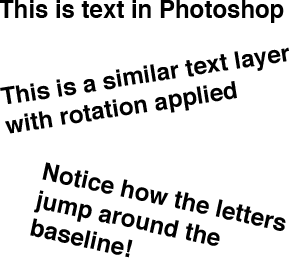
There are ways to work around this bug, but it is a bug, and a pretty egregious one. I mean, how hard can it be? Well, not very, since just about every other program I’ve ever used can render text at an angle and do it properly without obvious rounding errors—and without costing the price of a decent upper-arm prosthesis. It’s high time Adobe fixed it.
For a piece of software that costs so much, Photoshop can be pretty disappointing. I guess Adobe can afford to coast when they’ve got such a captive market, but it’s a program that increasingly feels like new features are just being phoned in from the beach.