Linux liposuction, or: Xubuntu in under a gig on the Eee PC

I got an Asus Eee PC for Christmas. It’s a black model with 4 GB (i.e. 3.7 GiB) of solid-state disk and 512 MiB of RAM. The specs aren’t particularly high end, obviously, but it’s cheap, small, light, and robust.

For around £200, you get a little computer with WiFi, a proper (if diminutive) keyboard, and the ability to be stuck in a bag and taken almost anywhere. It’s smaller and lighter than a hardback novel:
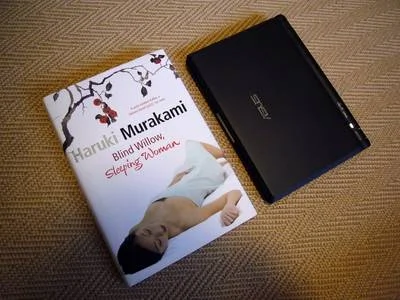
Asus Eee PC and a hardback novel

Plus, it comes running Linux out of the box! What’s not to like?

To be honest, I looked at the supplied distribution (Xandros) for about five minutes before wiping it and installing my preferred Linux, Ubuntu (in its XFCE variant) on there. I’ve spent the last few days tweaking it to work according to my preferences and optimally within the constraints of the hardware. There’s more to do, but I’m making progress.

As I mentioned, the internal storage is only 3.7 GiB. By default, Ubuntu takes a lot of that for itself, but it can be slimmed down quite drastically. Some of it I freed by removing unneeded packages, like the X11 drivers for graphics cards that I don’t have. Some was released by removing heavyweight software such as OpenOffice.org (I consider word processors actively harmful, but that’s a discussion for another day). Beyond that, though, I’ve delved a little deeper and given the operating system itself a bit of liposuction to take it down to under 1 GiB.

Here’s how.

I ran xdiskusage to find out where the disk space was being used most, and discovered, to my not very great surprise, that most of it (1.5 GiB) was taken up by the /usr directory. The obvious solution was to compress it, using a combination of squashfs and unionfs.

squashfs lets you compress a filesystem, but it’s read-only. unionfs, meanwhile, allows you to overlay a writeable filesystem on top to allow changes to the data. Obviously, the more you change the data, the more disk space is used, but it’s always possible to recompress and recover the space later on.

All the commands I’m going to give here need to be run as root, and I’m going to assume basic Linux competence. If it doesn’t make sense to you, you probably shouldn’t try it!

The first step is to install a couple of packages:

apt-get install squashfs-tools unionfs-tools

Then make a space for your compressed filesystem and overlay:

mkdir -p /.filesystems/usr/overlay

And compress your filesystem:

mksquashfs /usr /.filesystems/usr/usr.sqfs

Add these lines to /etc/modules:

unionfs
squashfs
loop

... and these lines to /etc/fstab:

/.filesystems/usr/usr.sqfs /usr squashfs ro,loop,nodev 0 0
unionfs /usr unionfs nodev,noatime,dirs=/.filesystems/usr/overlay=rw:/usr=ro 0 0

Next, reboot from a live distribution on a USB stick, CD, or SD card, mount the internal root partition, and move aside the old /usr directory:

mkdir /mnt/sda1
mount /dev/sda1 /mnt/sda1
mv /mnt/sda1/usr /mnt/sda1/usr.old
mkdir /mnt/sda1/usr

Reboot from the internal disk. Did it work? Then you can remove the /usr.old directory to reclaim the space.

After all that, my operating system takes only 832 MiB on disk, saving me about a gigabyte. That’s a significant improvement when there’s only 3.7 GiB to start with!

Comments

Skip to the comment form

  1. kota

    Wrote at 2007-12-31 20:10 UTC using Firefox 2.0.0.4 on Linux:

    As an everyday user of Xubuntu + OpenOffice, I’d like to know more about your opinion on word processors :)

    Where did you get the Eee that cheap? I thought it was around $1000.

    Cheers!
  2. Russ Stewart

    Wrote at 2008-01-02 03:52 UTC using Firefox 2.0.0.11 on Linux:

    Thanks for the info! I’m squashing as I type this. Has this bogged your system down noticeably?
  3. Paul Battley

    Wrote at 2008-01-02 18:52 UTC using Firefox 2.0.0.11 on Linux:

    Russ, I haven’t noticed any significant effects, but I didn’t time things before and afterwards, so I can’t give any numbers.
  4. Epo

    Wrote at 2008-01-06 23:08 UTC using Firefox 2.0.0.11 on Linux:

    Here’s my experience with eeeXubuntu: http://forum.eeeuser.com/viewtopic.php?pid=81110#p81110
  5. Barry

    Wrote at 2008-01-12 17:26 UTC using Firefox 2.0.0.11 on Linux:

    Paul,

    Thanks for the info, I have just squashed my /usr directory on my 2Gb eeepc and now have a reported 1.1 Gb available. As you suggested I created the compressed file on a memory stick and then having made a backup copy of the live /usr directory wrote the compressed file back to the SSD. Works a treat.

    The only thing that is worth saying is that people should make sure that they have a large enough memory stick to copy the live /usr directory out to. Mine consumed 1.2 Mb of the stick’s memory.

    Also I have not noticed any decrease in performance or increase in boot time.

    May I ask how you would suggest that I go about recompressing the /usr directory in time. I have just carried out another update and used another 18Mb from the SSD.

    Thanks again, Barry
  6. Paul Battley

    Wrote at 2008-01-13 12:10 UTC using Firefox 2.0.0.11 on Linux:

    To recompress, the most straightforward way would be to repeat the mksquashfs step to a second file, then boot from a USB drive and copy the new squashed file over the old one. Remove and recreate the overlay directory and reboot from the internal disk.
  7. stanbogdan

    Wrote at 2008-02-06 09:13 UTC using Firefox 2.0.0.11 on Linux:

    I came up with the same idea independently and as i read this post I wanted to make a comment about the speed of the system after you squash /usr : It actually increased significantly! Reasons (short version): decompressing data is faster than reading it from the hard drive, in most current computers, especially when you have multiple programs reading from the disk, causing thrashing, and/or when the data on the disk is fragmented. You can read more details about what i did and the results i had on http://forums.gentoo.org/viewtopic-p-4732709.html#4732709
  8. Jim - 406 NotAcceptable

    Wrote at 2008-03-31 13:35 UTC using Firefox 2.0.0.6 on Linux:

    I am quite shocked as to this being faster than running a non-compressed drive. Yo would expect a compressed drive to be slower, as it has to be decompressed by the processor—and the Eee doesn’t have the fastest of processors. Whilst degragmentation isn’t that much of an issue with a solid state drive, as the access times are negible.
  9. mark

    Wrote at 2008-04-08 10:33 UTC using Unknown browser on Linux:

    thanks for the how to, im in the process of doing it on my icebuntu install…installed size is about 800mb, and /usr is currently over 500mb of that, so it will be interesting to see how much it helps, are there any other directorys that i can do this to?
  10. mark

    Wrote at 2008-04-08 11:06 UTC using Unknown browser on Linux:

    after doing this to Icebuntu my install size is 500mb!! i wonder if it is possible to do this to any other folders to save even more space
  11. Dan Fekete

    Wrote at 2008-05-17 05:41 UTC using Firefox 2.0.0.14 on Linux:

    Has anyone tried this with the squashfs-LZMA patch? If so, what was the resulting compression ratio?

    PS – thanks for the great howto, I’m about to try it…
  12. Passerby

    Wrote at 2008-05-22 21:26 UTC using Firefox 3.0 on Windows XP:

    To make things a little easier, you can get rid of the rebooting stuff by switching to runlevel 1 on your running system and doing the work there.

    Just replace the following section

    Next, reboot from a live distribution on a USB stick, CD, or SD card, mount the internal root partition, and move aside the old /usr directory:

    mkdir /mnt/sda1
    mount /dev/sda1 /mnt/sda1
    mv /mnt/sda1/usr /mnt/sda1/usr.old
    mkdir /mnt/sda1/usr

    with the following:

    Switch to runlevel 1:
    init 1
    (Ubuntu will prompt you what to do—choose opening a root shell)

    Move aside the old /usr directory:
    mv /usr /usr.old

    Test whether you previously edited fstab successfully by typing:
    mount -a

    If you get error messages or your /usr directory shows up empty, either fix your fstab or undo the changes before rebooting.

    Instead of the final reboot, you could also just return to runlevel 3 via:
    init 3

    Thanks for the tutorial; it helped me shrink /usr from 1,9 GB to 0,8GB and /var from 180MB to 50MB.
  13. Zerjillo

    Wrote at 2008-07-09 08:04 UTC using Firefox 3.0 on Linux:

    Thanks for all the info, including the comments. I think you should improve the post with his suggestions. Much more efficient to switch to runlevel 1 to make the directory change.

    From a 1.98GB usr directory I finally came up with a 668 MB compressed filesystem (almost 66% reduction!).

    Greetings

    Zerjillo

Leave a comment

Please read the comment guidelines before posting. Comments are Gravatar-enabled. Your email address will not be published.

To prove that you’re human, type human in the Bot check field.