Experiencing iPhone OS for the first time

I’ve never really used an iPhone or iPod touch (they share the same OS, although only the former has the telephony part) before now. I picked up a second hand iPod touch yesterday to assist me with my iPlayer hacking, and it’s given me the first chance to experience the user interface in any depth.

My new-old iPod is a first generation device, but it has the latest firmware (3.1) on it. For comparison, I have an HTC Hero phone, running Android 1.5—we’re still waiting for HTC to get around to releasing their long-promised and repeatedly delayed OS upgrade. So round one goes to Apple: they are much better at releasing upgraded versions of the operating system for their handsets than HTC.

I thought it would be interesting to record my initial impressions of using the iPhone OS from a user interface point of view. It’s not quite as perfect as I’d been led to expect, but it’s pretty good. From a hardware standpoint, both the iPod and the Hero are competent enough that I feel justified in blaming any slowness on the software.

It’s hard to go back a screen on iPhone OS if you’re right-handed and holding the device in the natural way. The back link is in the top left, at the furthest point on the screen from your thumb. Is Steve Jobs left handed? Or Jonathan Ives, maybe?
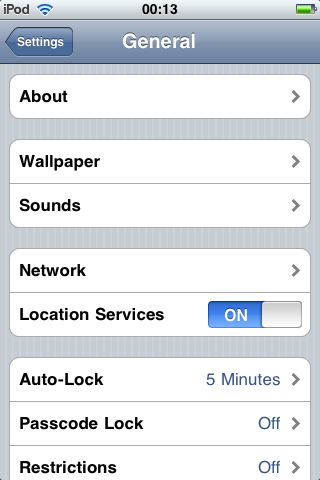
iPod touch settings screen showing Back button in top left

Both the Hero and the iPod exhibit occasional user interface latency. The latency of the Hero is unpredictable; the iPod freezes during certain procedures, such as when attaching an image to an email.

The iPhone OS on-screen keyboard is much better than on the Hero. The difference is much bigger than I would have imagined possible, and goes to show that there’s a lot more to making an on-screen keyboard than just putting a keyboard on a screen. The larger screen and greater spacing between letters of the makes a difference, as does the responsiveness of the interface. There’s a perceptible delay in response on the Android keyboard, but the iPhone OS’s feels like it responds instantly. I’m also told that the keyboard dynamically resizes the target area for each key based on the probability of it being the next letter.

The graphical design of the iPhone OS user interface looks a bit tacky to me. It’s something to do with the corner radii and the tired and overused gloss effect on everything, I think. The home screen icons of the default apps that come with the OS are a mish-mash of colour and style, and some of them are just really lazy, poor design, such as the Mail, Weather, and Music icons. That Notes icon in particular is just awful.
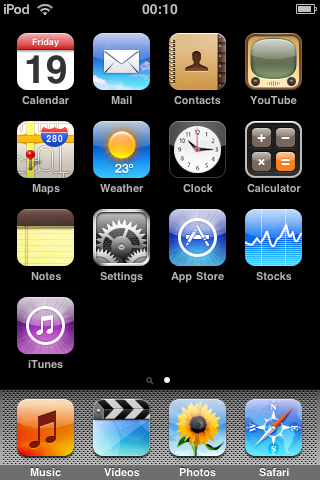
iPod touch home screen

The mesh background at the bottom of the home screen looks like the dashboard of a boy racer’s souped-up Type-R. I’m not sure what it’s doing there. Not a good look.

The black background of the home screen isn’t very appealing, but there’s no way to change it as far as I can tell.

It’s easy to take a screenshot on iPhone OS once you’ve looked up the button combination (hold bottom button, press top button, release bottom button). It’s almost impossible on Android. I’ll therefore forgive the iPhone OS for storing (or sending) the screenshots as JPEGs.

In summary: looks a bit tired; works well; keyboard is excellent.

Comments

Skip to the comment form

  1. Ed

    Wrote at 2010-03-19 02:04 UTC using Firefox 3.6 on Mac OS X:

    You can jailbreak to change the background etc, and fiddle with all the icons and so on. I’d recommend it if you just want to see what’s possible, but I did it for a while and couldn’t see much reason to keep it jailbroken, so went back to being legit!

    The iPad is shown with a customisable background, I’d expect the next iPhone OS update will have one.
  2. Richard Earney

    Wrote at 2010-03-19 07:38 UTC using Safari 531.22.7 on Mac OS X:

    The iPhone screenshots are only JPGs if you email them from the Photos app.
    Copy and Paste the thumbnail from Photos into Mail and they will be sent as 320×480 PNG files.
  3. Anon

    Wrote at 2010-03-19 07:41 UTC using Firefox 3.5.8 on Linux:

    Is it just me, or does that App Store icon scream “Masonic Imagery”?
  4. Paul Battley

    Wrote at 2010-03-19 08:11 UTC using Chrome 5.0.356.0 on Linux:

    Thanks for the hint, Richard. I’ve changed the screenshots to PNGs.
  5. Andy Stewart

    Wrote at 2010-03-19 08:50 UTC using Unknown browser on Mac OS X:

    Well it’s about time something was made for left-handers. Now to build a left-handed scissors app which won’t work for right-handers…
  6. James Adam

    Wrote at 2010-03-19 13:27 UTC using Unknown browser on Mac OS X:

    I think the ‘left-handed’ issue is unavoidable; in a left-to-right world, moving ‘backward’ in the application is always going to involve an interation on the left.

    Personally, I don’t think it’s much of an issue; I’m left-handed, but more often than not I’m using the phone in my right hand, and while it’s definitely at the extent of my thumb’s reach to go back, it’s not uncomfortable to do so.

    Most of the ‘action’ areas in applications are also on the right (see the ‘edit’ and ‘new mail’ buttons in Mail, for example). I’m pretty sure the device is as optimised for right-handed use as possible.
  7. Paul Battley

    Wrote at 2010-03-19 13:38 UTC using Chrome 5.0.353.0 on Mac OS X:

    Top left is definitely the obvious place to put it, but I’m not sure that it has to be there. The Hero has a physical back button on the bottom right, although that paradoxically suffers from being too close – it’s hard to maintain a stable grip and press the button.

    I was actually surprised that a simple swipe didn’t take me back on the settings page: that’s what I tried first, before stretching for the button.
  8. Daniel Hardy

    Wrote at 2010-03-19 18:48 UTC using Firefox 3.6 on Mac OS X:

    Reaching for the top left to go back really does start to become second nature after a while. What I find odd is how the size (length) of the back button can change depending on what app your in (especcially with non-Apple apps).

Leave a comment

Please read the comment guidelines before posting. Comments are Gravatar-enabled. Your email address will not be published.

To prove that you’re human, type human in the Bot check field.

Trying to post some program output or a long code sample? Please use a paste service and link to it instead.